NiceSurveys - Paid Surveys
- 4.4
- Rating
- 100.00K
- Installs
- Free
- Price

 Analysis by App-foxy
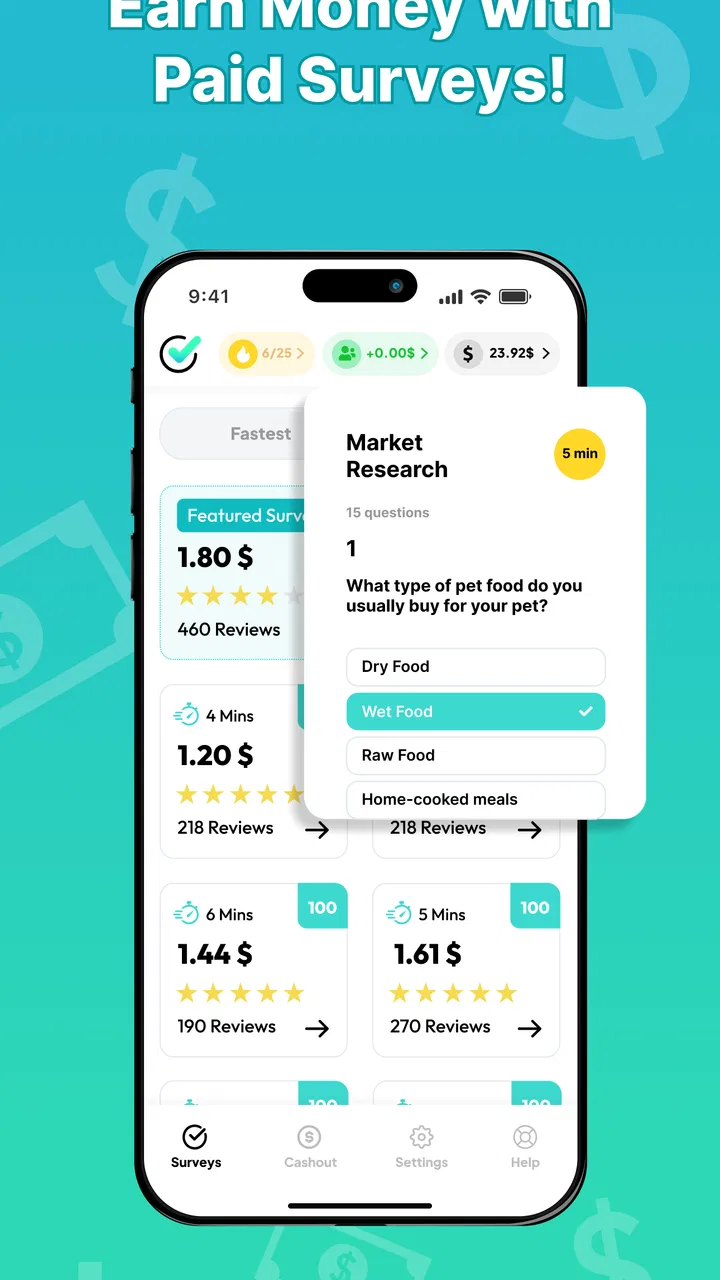
I approached NiceSurveys as a practical lifestyle app rather than a quick-money shortcut. Its basic idea is simple: you answer surveys and receive payment for sharing your opinions. That sounds easy, but the real question is whether the experience is comfortable, understandable, and realistic for different people and everyday situations. After spending time with it, I found an app that is approachable at first glance, while still requiring patience and careful attention from anyone hoping to make survey work part of a routine.
NiceSurveys is made by Make Opinion GmbH and is free to use. It sits in the lifestyle category, carries a Mature 17+ rating, and runs on Android 7.0 or later. The app reached the store on May 17, 2025, and the current version is 1.0.8. Its average score is 4.4 from around twelve thousand ratings, with roughly three thousand reviews and more than one hundred thousand installs. Those figures suggest that it has already attracted a meaningful audience, although popularity alone does not guarantee that every survey will suit every user.
How NiceSurveys works in real life
The main appeal is the low barrier to entry. You do not need specialist knowledge, a portfolio, or a complicated setup to understand the purpose of the app. The activity is based on giving opinions, so it may fit naturally into spare moments when I am waiting for an appointment, sitting on public transport, or taking a short break at home. That makes it different from freelance platforms, where I would need to search for jobs, negotiate requirements, and deliver a finished piece of work.
You May Also Like

 Pandora - Music & Podcasts
Pandora’s Music Is Easy to Start, but Harder to Recover
Pandora’s strength is its low-effort path from a seed to a station. Its weak spot is how much confidence it asks you to place in connection, setup, and quiet recovery.

 AccuWeather: Weather Radar
AccuWeather Review: A Quick, Clear Forecast for Everyday Decisions
For everyday plans, the best forecast is the one you can understand quickly. AccuWeather makes rain timing, radar, and local conditions easy to act on, with a few trade-offs.

 Hill Climb Racing
Why Hill Climb Racing Still Turns Crashes Into One More Run
A tiny car, a bumpy hill and one more upgrade: Hill Climb Racing keeps resurfacing because its simple chaos makes every near-miss feel personal.

 AliExpress - Shopping App
AliExpress Makes Global Shopping Feel Personal, but Shoppers Bear the Risk
AliExpress turns a global marketplace into a pocket-sized discovery engine. Its reach is useful, its shopping loop compelling, and its trade-offs easy to miss.

 Lords Mobile: Kingdom Wars
Lords Mobile Is a Kingdom-Building Routine, Not a Quick Match
A case-by-case verdict on the building, battles, device demands, and social commitments that make Lords Mobile rewarding for some players and exhausting for others.

 PDF Scanner app - TapScanner
TapScanner Makes Paperwork Easier to Capture, Check, and Share
TapScanner makes scanning with a phone feel less like a rescue operation and more like a dependable step in getting work done. Its capture tools are useful, though not flawless.
More From Our News Desk
View All News


At the same time, I would not treat survey apps as a dependable replacement for employment. The amount of time available and the suitability of individual questionnaires can vary, and answering carefully matters more than rushing through screens. My most useful mindset was to see NiceSurveys as a small supplementary activity. If you need predictable income, a fixed hourly rate, or guaranteed work, a conventional part-time role will usually be a better fit.
The free entry is important for this kind of app. I can try the experience without first paying for access, which makes it easier to decide whether the format matches my attention span and daily schedule. Before committing regular time, I would still read each screen closely, understand how participation and payment work inside the app, and avoid assuming that every available survey will be equally worthwhile.
Readability and navigation matter more than flashy design
For a survey app, clear reading is not a cosmetic detail. The whole purpose is to understand a question, compare possible answers, and respond accurately. NiceSurveys benefits from having a straightforward concept: I am not learning a complicated game system or navigating a large social network. That simplicity can make the first session less intimidating, especially for someone who has never used a paid-opinion service before.
Still, survey screens demand concentration. A question with several similar answers can be tiring when the wording is dense or when I am trying to use the app in a noisy place. I found it better to slow down, read the entire prompt, and check whether an answer refers to a specific time period or situation. This is one of the less obvious trade-offs: an apparently short survey can still require careful reading, and speed is not always the best measure of efficiency.
Users who prefer larger text, strong contrast, or a very spacious layout should judge the interface during the first few surveys rather than relying only on the store summary. The app’s purpose is easy to understand, but comfort depends on how well each question can be read on a particular phone. I would keep the device at a comfortable viewing distance, increase system text size if needed, and avoid answering while walking or multitasking.
Navigation is also tied to confidence. When I am unsure whether I have selected an answer, moved forward, or completed a section, I am more likely to make a mistake. A calm workflow helps: open the app when I have a few uninterrupted minutes, complete one survey at a time, and review important choices before continuing. That routine is more useful than trying to squeeze answers into every tiny gap in the day.
Motor and sensory considerations during survey sessions
NiceSurveys may be easier for some people with limited mobility than tasks that involve typing long documents, carrying equipment, or travelling to a workplace. Selecting an answer can be less physically demanding than producing a large piece of written work. However, that does not mean the experience is effortless for everyone. Repeated tapping, scrolling, and precise selection can become uncomfortable for users with hand pain, tremors, or reduced dexterity.
My practical advice is to use short sessions instead of treating the app like a long sitting. Resting the phone on a stable surface can reduce the need to hold it continuously, while a larger device may make answer choices easier to distinguish. I would also avoid attempting a survey when my hands are occupied, when I am moving through a busy space, or when glare makes the screen difficult to read.
For sensory needs, the setting may matter as much as the app. A quiet room makes it easier to focus on wording, while a bright but indirect light can reduce screen glare. Someone sensitive to interruptions should silence unrelated notifications before starting. I would not assume that a survey can always be paused safely at any point, so beginning only when I can finish without distraction is the safer approach.
People who rely on assistive technologies should test the actual question flow with their usual device settings. I can describe the app as simple to understand, but I would not claim that it provides a particular accessibility certification or that every control works identically with every assistive tool. The sensible approach is to try a short session and check whether labels, answer controls, and progress cues remain understandable with the settings you depend on.
Situational access: when the app fits and when it does not
The strongest use case I found was a planned pocket of time. For example, imagine finishing a lunch break with ten quiet minutes left. I can open NiceSurveys, read the available opportunity, and decide whether I have enough attention to complete it properly. That is a better situation than opening it while waiting in a crowded queue, where noise, poor reception, or a sudden change in plans could make the experience frustrating.
The same principle applies to people with irregular schedules. A parent may prefer a session after the children are asleep, while a student might use a free period between classes. Someone working shifts could fit surveys around changing hours more easily than a fixed online task. In each case, the app works best as an optional activity that bends around life, not as another obligation demanding constant checking.
It can also suit users who are comfortable expressing opinions but do not enjoy public discussion. Unlike social networks, the activity is private in the sense that the user is responding to research-style prompts rather than trying to build an audience. That may appeal to people who want a quieter digital task. On the other hand, anyone who dislikes repetitive questions or feels uncomfortable sharing personal viewpoints may quickly lose interest, even if the payment idea sounds attractive.
Compared with cashback apps, NiceSurveys focuses more directly on answering questions rather than changing shopping habits. Compared with microtask services, it is less about completing varied digital jobs and more about giving feedback. Those alternatives may be preferable if you want rewards connected to purchases or if you prefer tasks with visible, concrete outputs. NiceSurveys is the more natural choice when the activity you want to offer is your opinion and your available resource is spare attention.
Small workflow choices can make the experience better
My first tip is to protect answer quality by separating browsing from completing. I would open the app to see what is available, then choose one survey that fits the time I actually have. Starting several at once creates unnecessary pressure and makes it easier to forget where I left off. A single-session habit also helps me notice whether the time and effort feel worthwhile for my own routine.
Second, I would treat eligibility questions seriously instead of guessing what seems likely to qualify. Honest answers are important because the value of a survey depends on the quality of the information collected. Rushing through introductory questions may save a few seconds, but it can make the rest of the session less useful and more confusing.
Third, I would keep a personal note of how the app fits into my week. I do not mean recording invented earnings or promising myself a target. I mean noting which times of day are comfortable, whether reading on my phone causes fatigue, and whether I prefer shorter sessions. This simple habit reveals whether NiceSurveys is genuinely convenient or merely tempting when I am bored.
A fourth useful habit is to check the final screen before closing the app. I would confirm that the survey appears to have been submitted and that any relevant progress or reward information is visible. This is especially important when using a weak connection or when an interruption occurs. I would never assume that closing the app automatically means the entire questionnaire has been recorded.
Remaining barriers and who should think twice
The biggest barrier is not learning how to use the app; it is managing expectations. “Get paid” can sound like a promise of steady income, but survey work is better understood as occasional compensation for spare time. Anyone who needs rent money, a fixed weekly amount, or immediate financial certainty should look elsewhere. NiceSurveys may complement a budget, but I would not build a budget around it.
Attention is another real cost. A survey can be easy to operate and still mentally demanding when several questions use similar wording. Users with reading difficulties, concentration challenges, or language barriers may need more time than the app’s simple premise suggests. That does not automatically make it unsuitable, but it does mean the personal effort should be judged honestly rather than measured only by the possibility of payment.
Age is also relevant. The Mature 17+ rating means this is not an app I would recommend casually to younger teenagers. Parents and guardians should take that rating seriously and consider whether the service is appropriate for the individual user. For adults, the rating is a reminder to read prompts carefully and to decide in advance what kinds of questions they are comfortable answering.
People with limited data access or older devices should also be selective about when they use it. NiceSurveys supports Android 7.0 and later, which covers many older phones, but compatibility is not the same as a guarantee of a comfortable experience on every screen size or under every connection. I would use a stable connection where possible and avoid starting a survey when I know I may lose access halfway through.
Finally, users who expect extensive customization may find the experience less satisfying than a general productivity tool. This is not a planner, budgeting system, or learning app. Its value comes from a narrow activity, and that focus is both its strength and its limitation. If you want a broad set of ways to earn, you may prefer a platform built around multiple kinds of remote tasks.
An inclusive verdict for different users
My overall view is that NiceSurveys is a reasonable option for adults who want a simple, low-commitment way to turn spare attention into survey participation. I like that the purpose is immediately understandable and that the app is free to try. Its lifestyle positioning makes sense because it fits around ordinary routines rather than requiring a dedicated professional setup.
From an inclusion perspective, the app is most promising for people who can read comfortably on their device, make repeated selections without pain, and choose quiet moments for focused work. It may be useful for users with irregular schedules, people who prefer private opinion-based tasks, and anyone looking for a small activity between larger responsibilities. The best experience comes from adapting the session to personal needs instead of forcing the app into unsuitable circumstances.
I would be more cautious for anyone who needs guaranteed earnings, has difficulty with dense text, experiences discomfort from repeated tapping, or depends on assistive settings that need to be tested carefully. In those cases, a different earning option with clearer task variety, stronger control over workload, or more suitable input methods may be a better choice.
After using it, I would recommend NiceSurveys to a friend with one clear condition: treat it as flexible survey participation, not a dependable job. Start with a short session, check whether the questions are comfortable to read and answer, and decide whether the time feels fair for your own circumstances. That honest trial tells you more than the promise of easy money. For the right user, the real advantage is its low-pressure entry into opinion-based earning; for everyone else, knowing when to stop is just as valuable.
FAQs for NiceSurveys - Paid Surveys
01What is NiceSurveys - Paid Surveys, and how does it work?
NiceSurveys - Paid Surveys is a rewards app that allows users to answer market-research questionnaires in exchange for points or other available rewards. After creating an account, you may receive survey invitations based on your profile, location, and demographic information. Survey availability and completion time can vary, so the app is better viewed as a way to earn occasional extra rewards rather than a dependable source of income.
02How much money can I earn with NiceSurveys - Paid Surveys?
Your earnings depend on the number of surveys available to you, their individual rewards, and whether you qualify after answering the initial screening questions. Some surveys may offer only a small amount, while longer or more specialized questionnaires can provide higher rewards. Availability is not guaranteed every day, and users should carefully review the reward details before starting each survey.
03How do I receive rewards from NiceSurveys - Paid Surveys?
The available withdrawal methods and minimum payout threshold may depend on your country, account status, and the current version of the application. Before investing significant time, open the rewards or cash-out section to check which options are offered in your region. Processing times can also vary, and some rewards may require account verification or additional information before they are issued.
04Why am I disqualified from some surveys?
Survey providers usually screen participants to find specific audiences, such as people within a certain age group, profession, location, or purchasing category. Being rejected after answering a few preliminary questions does not necessarily mean there is a problem with your account. To improve your chances, complete your profile honestly, answer consistently, and avoid rushing through questions or submitting duplicate responses.
05Is NiceSurveys - Paid Surveys safe and worth downloading?
The app may be useful for users who are comfortable sharing basic demographic and consumer-opinion information in return for small rewards. However, you should review its privacy policy, permissions, terms, and payout conditions before registering. Never provide unnecessary sensitive information, and remember that paid-survey apps generally offer modest earnings. Its value depends mainly on survey availability and whether the withdrawal options suit your location.
Pros
- Simple survey interface that is easy to navigate for beginners.
- Offers a convenient way to earn small rewards during spare time.
- Survey invitations can be completed directly from a mobile device.
- Registration and profile setup are generally quick and straightforward.
- Available surveys may cover a variety of everyday topics and opinions.
Cons
- Survey availability may vary significantly by location and user profile.
- Rewards are modest and usually require consistent participation to accumulate.
- Some surveys may screen you out after answering several questions.
- Notifications can become frequent if many survey invitations are available.
- Payout methods
- thresholds
- and processing times may limit convenience.

NiceSurveys - Paid Surveys
Gallery